Automated emails that send themselves
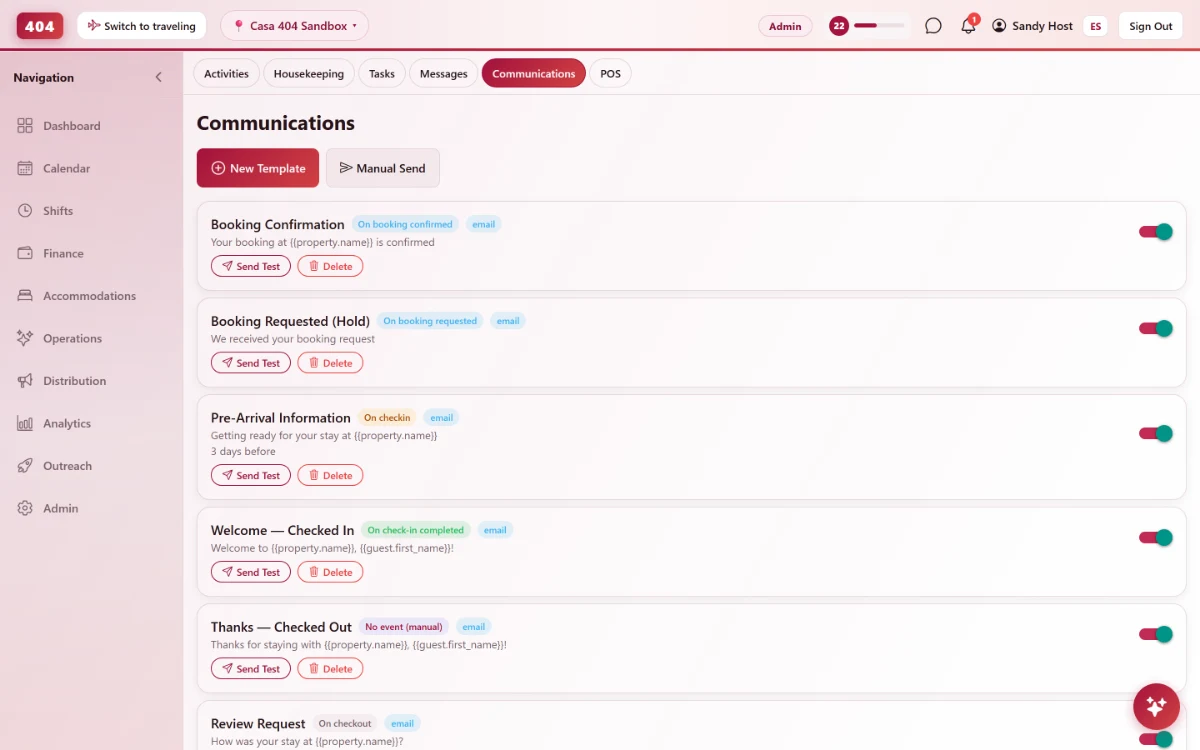
Set up a template once — booking confirmed, before arrival, after checkout — and every guest gets it automatically, in their own language, with their real booking details.
-
Automated Templates
Eight moments, one setup
Booking requested, confirmed or canceled. Before or after check-in. Before or after checkout. Birthday. Hold expired. Pick the moment, write the email once, and it fires for every guest who reaches it — no one has to remember to send it.
- Fires on 8 booking-lifecycle events
- Before/after check-in and checkout
- Runs per accommodation type
- Sent in the property’s own voice
-
Merge Tags
Real booking data, not placeholders
Every template pulls straight from the live reservation — plus a few links no other hostel PMS gives you.
-
Claim-booking link
{{claim_link}} lets an OTA guest with a masked email claim their booking with any address of their own.
-
Online check-in
{{registration_link}} sends guests to a form for passport, nationality and arrival time.
-
Arrival survey
{{survey_link}} lands answers on the booking, the guest profile, and property stats.
-
Balance & folio
{{reservation.balance_due}} and {{reservation.total_amount}} always match the real folio.
-
Common questions
What language does the guest actually get?
Whatever the guest prefers, or your property's default if none is set. Write one template with a full English and Spanish version, and Travel404 picks the right one per guest automatically.
Can I limit a template to one room type?
Yes. Leave it unscoped and it fires for every accommodation type, or restrict it to just dorms, just privates, or one specific type.
What about a guest who booked through an OTA and has no real email?
The {{claim_link}} merge tag still reaches them — it lets an OTA guest claim the booking in the Travel404 app with any email address, even when the OTA masked the original one.
Can I send something manually instead of on a schedule?
Yes — set the trigger to "No event" and the template becomes a one-off you send by hand from the booking.
See it running in your hostel
Set up in 30 minutes. No credit card required.