The daily cleaning list your team actually follows
Room status, a daily task list, and staff assignments in one screen — so cleaners know what's dirty, what's next, and who's doing it.
-
Today’s list
One checklist, not five WhatsApp messages
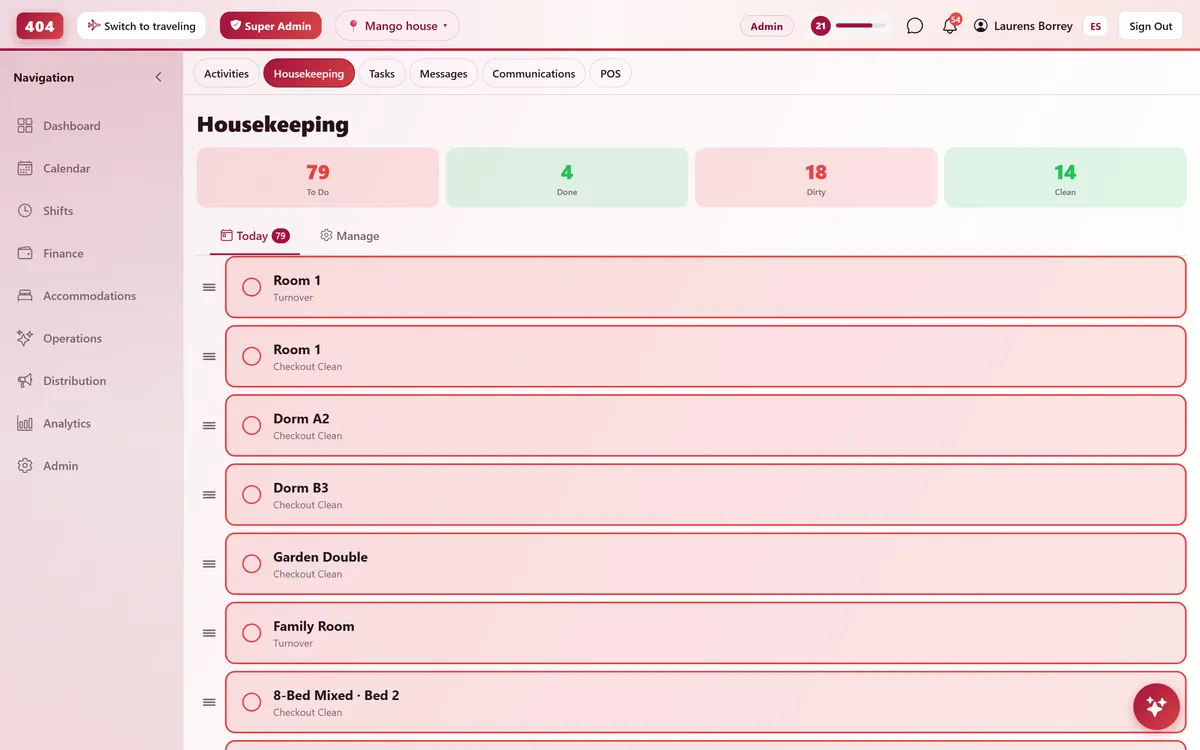
The Today tab merges open cleaning tasks with rooms marked dirty into a single ordered list. A cleaner taps a room to mark it done and the status updates immediately — managers see it change in real time, nothing has to get reported out loud.
- Dirty rooms auto-added to the list
- Tap to mark clean, tap to undo
- Drag to reorder priority
- Live to-do / done counts
-
Manage tab
Turnovers, deep cleans, and who’s assigned
Generate a daily task list straight from today’s checkouts, or add one by hand with a room, task type and due date. Track room status, assignments, and who cleaned what this month.
-
Generate from checkouts
One tap builds today’s cleaning list from checkout rooms.
-
Room status board
Every room shown as clean, dirty, in progress, inspected or out of order.
-
Assign by name
Give a room or task to a specific cleaner in two taps.
-
Task types & priority
Checkout, stayover, deep clean, weekly clean, turnover — urgent to low.
-
Staff performance
Tasks completed and rooms cleaned per person, this month.
-
-
Beyond cleaning
Maintenance and front-desk tasks too
Not everything is a cleaning task. A separate task tracker covers maintenance, front desk and admin work — with a priority, an assignee, a due date and a comment thread, so nothing gets lost between shifts.
- Maintenance, front desk, admin
- Comments on every task
- Due dates and a my-tasks filter
- Notifies whoever it’s assigned to
Common questions
Does housekeeping know which rooms need cleaning without me telling them?
Yes — checkouts feed straight into the Today list, and Generate builds a task for every room that just checked out.
Can I assign a specific room to a specific cleaner?
Yes. Open the room from the board, pick a status and a name from your staff list, and save. It shows up on their list right away.
What if it’s not cleaning, like a broken light?
Log it as a maintenance task instead. It gets a category, priority and assignee, and comments keep everyone updated until it’s fixed.
Can I see who’s actually getting work done?
The Manage tab shows tasks completed and rooms cleaned per staff member for the current month.
See it running in your hostel
Set up in 30 minutes. No credit card required.