One login, every property
Run more than one hostel or coliving space from a single account. Switch between properties in one tap, while every booking, guest and payment stays locked to the property it belongs to.
-
Switch In One Tap
Every property is one dropdown away
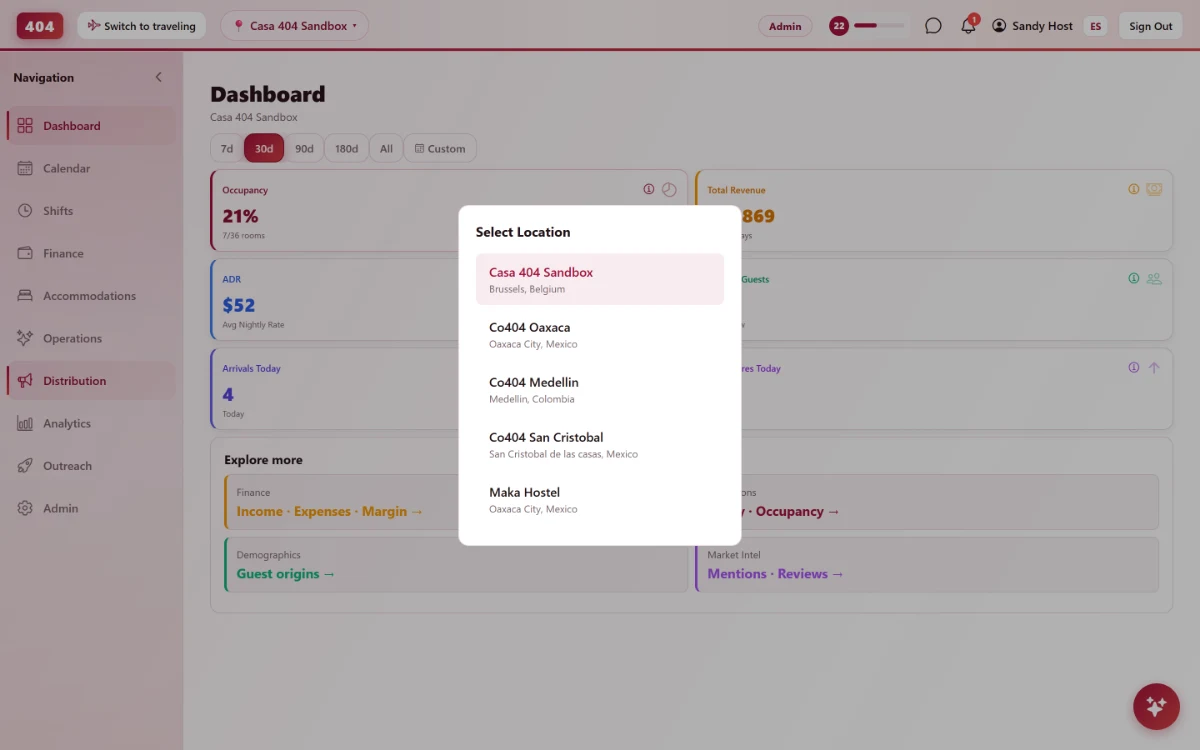
A single pill in the header shows the active property. With more than one, tapping it opens a list by name and city — pick one and the whole app updates, no reload and no re-login.
- One dropdown, every property
- No re-login to switch
- City shown under each name
- Hidden when there is only one
-
A Real Line Between Properties
Data never crosses property lines
Every reservation, guest, task and payment carries the property that owns it, and the server checks that ownership on every single request — not just in what the menu shows.
-
Scoped by property
Bookings, guests, payments and tasks are tied to one property each.
-
Checked on the server
The access check runs on every request, so a guessed link still fails.
-
Fails closed
A database hiccup denies access rather than waving a request through.
-
-
Staff Access, Property By Property
Grant access one property at a time
A staff account’s role and permissions are set per property, so someone hired for one location cannot see another’s bookings by accident.
-
Per-property roles
The same person can hold different permissions at different properties.
-
Access can expire
Grant a date-limited login for seasonal or short-term staff.
-
Revoked in one place
Remove a person from one property without touching their access to the others.
-
Common questions
Can one staff account work at two properties?
Yes, if they are granted access to both — the role and permissions are set separately for each property.
What if I only manage one property?
The property switcher does not even appear. It only shows up once an account has access to more than one.
Can a manager at one property see another property’s bookings?
No. The backend checks property ownership on every request, so knowing an ID is not enough to reach another property’s data.
Does switching properties log me out or reload my session?
No — it is instant. The account stays logged in; only the active property context changes.
See it running in your hostel
Set up in 30 minutes. No credit card required.