Check-in starts before they arrive
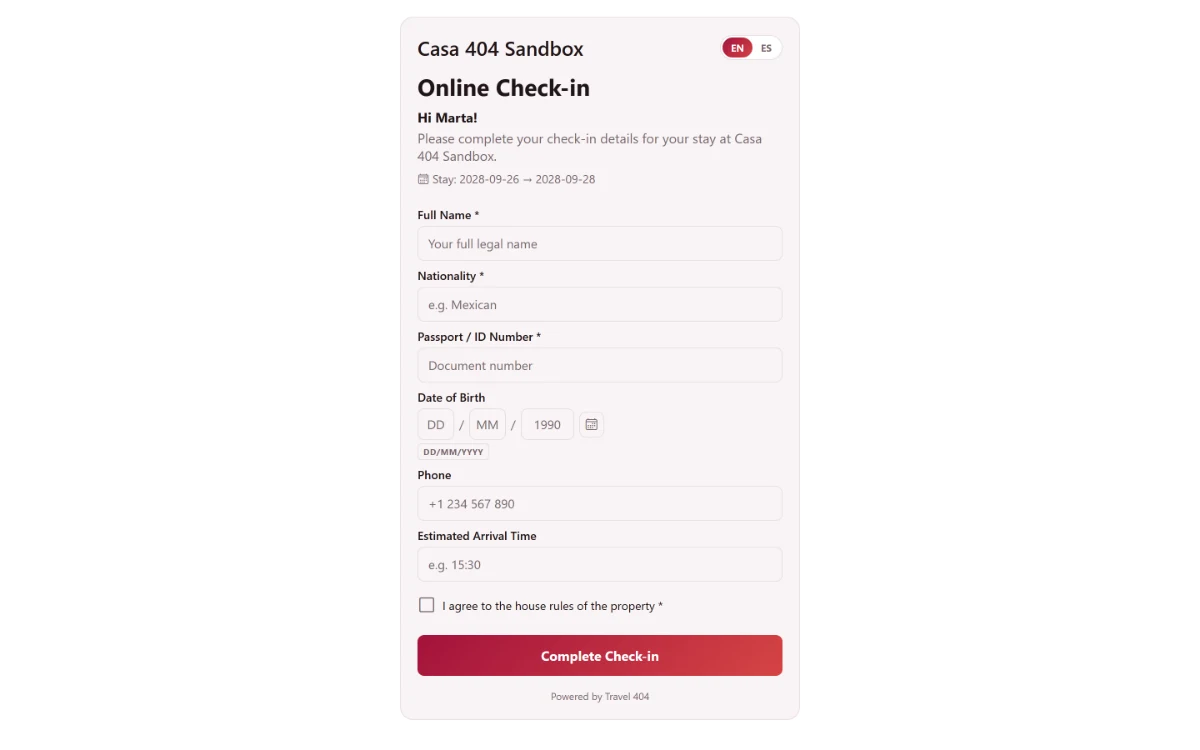
Every booking gets its own check-in link. Guests fill in their name, nationality, passport, date of birth and arrival time from their phone — no app, no front-desk line, no login.
-
The Check-in Form
A form guests fill in themselves
The link opens straight to the property name and stay dates already filled in. The guest adds the rest, confirms they have read the house rules, and submits — done before they knock on the door.
- Full name, nationality, passport
- Date of birth and phone
- Estimated arrival time
- Confirms house rules read
-
One Link, No Login
It just arrives — nobody sets it up
The link rides in the booking confirmation email automatically. Possession of it is the only credential — there is no password to forget and no account to create.
-
Sent automatically
The check-in link is included in the confirmation email for every booking.
-
No app required
Opens in any phone browser — nothing to download, nothing to install.
-
Editable after submitting
A guest can reopen the link and correct a typo; it overwrites, never errors.
-
-
Staff See It Happen
Know who has checked in online, and when
The Guest tab shows whether the form is complete, and the booking History logs the moment it was submitted and by whom.
-
Complete or pending
Every reservation shows its online check-in status at a glance.
-
Logged in History
The submission lands in the booking History with its timestamp, like every other change.
-
Logged in History
Submission shows up as a guest-actioned event, next to staff actions.
-
Common questions
What information does the guest fill in?
Full name, nationality, passport or ID number, date of birth, phone, and estimated arrival time — plus confirmation they have read the house rules.
Does the guest need to download an app or create an account?
No. The link is the credential. It opens the form in a browser and works on any phone.
How does staff know a guest checked in online?
The reservation flips to registration complete, a History entry is logged with the timestamp, and the Guest tab shows how many times the link was opened.
Can a guest fix a mistake after submitting?
Reopening the link shows a confirmation rather than the form again, so ask them to tell reception — staff can correct any detail on the booking in seconds.
See it running in your hostel
Set up in 30 minutes. No credit card required.