The numbers behind every bed
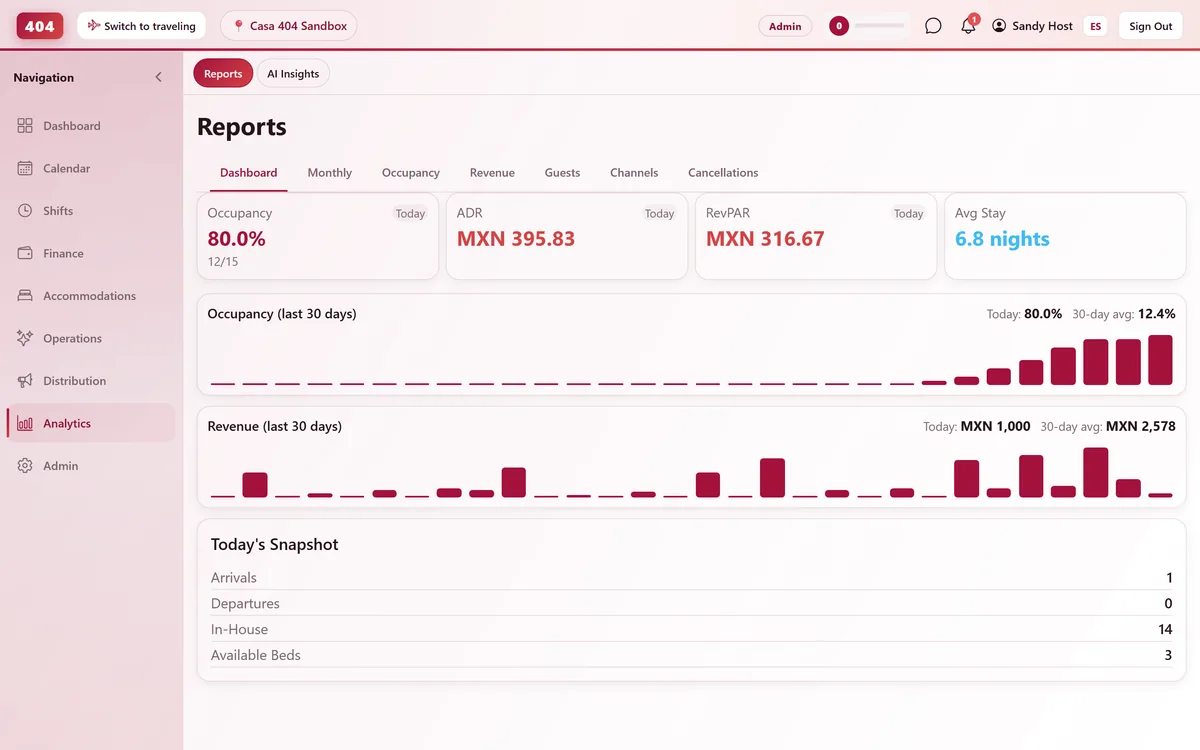
Occupancy, ADR, RevPAR and revenue broken down by month, room type and channel. Pick any date range, compare it to last period or last year, and see what actually moved.
-
Seven Tabs, One Property
Every angle, without leaving the screen
Dashboard, monthly, occupancy, revenue, guests, channels and cancellations — each a tab on the same reports screen, with a period picker from 7 days to all-time or a custom range.
- 7 report tabs in one place
- 7-day to all-time ranges
- Custom date range picker
- Compare to a prior period
-
The Metrics That Matter
ADR, RevPAR, and what is really behind them
The monthly report builds each figure from the check-in cohort, room type and true nights sold — not a rough estimate.
-
ADR & RevPAR
Average daily rate, and revenue per available room calculated as ADR × occupancy.
-
Occupancy by room type
See which dorm, private or mixed type is carrying occupancy this month.
-
Extensions tracked
How many guests extended their stay, and by how many nights on average.
-
Clean cancellation rate
Test bookings and $0 room blocks are excluded so the rate reflects real guests.
-
-
Know If You Are Improving
Compare against last month or last year
Turn on Compare to overlay the same length of time from the period before, or the same dates a year ago. Longer ranges bucket into readable weekly or monthly bars instead of a wall of daily noise.
- Compare vs previous period
- Compare vs same time last year
- Weekly bars for long ranges
- Guest and channel breakdowns
Common questions
How is RevPAR calculated?
ADR × occupancy rate — the standard formula, not a separate revenue-per-room query that could disagree with the rest of the report.
Can I see performance broken down by room type?
Yes, the monthly report includes an occupancy breakdown per accommodation type, not just the property total.
Do internal or test bookings affect the numbers?
No. Training bookings and zero-value room blocks are excluded from bookings, revenue and cancellation counts.
Can I compare this month to the same month last year?
Yes — turn on Compare and choose either the previous period or the same dates a year earlier as the baseline.
See it running in your hostel
Set up in 30 minutes. No credit card required.